All posts
The 5 levels of running coding agents
Most teams still run coding agents one chat at a time. Here's how the setup grows, from a single terminal to an orchestrator that manages every agent for you.
Ben Ong
November 17, 2026
ai-agents
SDLC

Five stages from a single terminal to a central orchestrator hub connected to separate machines
TL;DR: Most people still run coding agents one chat at a time. The setup we've landed on puts a single coordinating agent in charge. It hands out the work, keeps an eye on every coding session, and only comes back with finished results or decisions a person needs to make. There are five stages on the way there, and each one solves the problem the previous stage created.
Here's how the setup usually evolves, what each stage gets right, and where it starts to hurt.
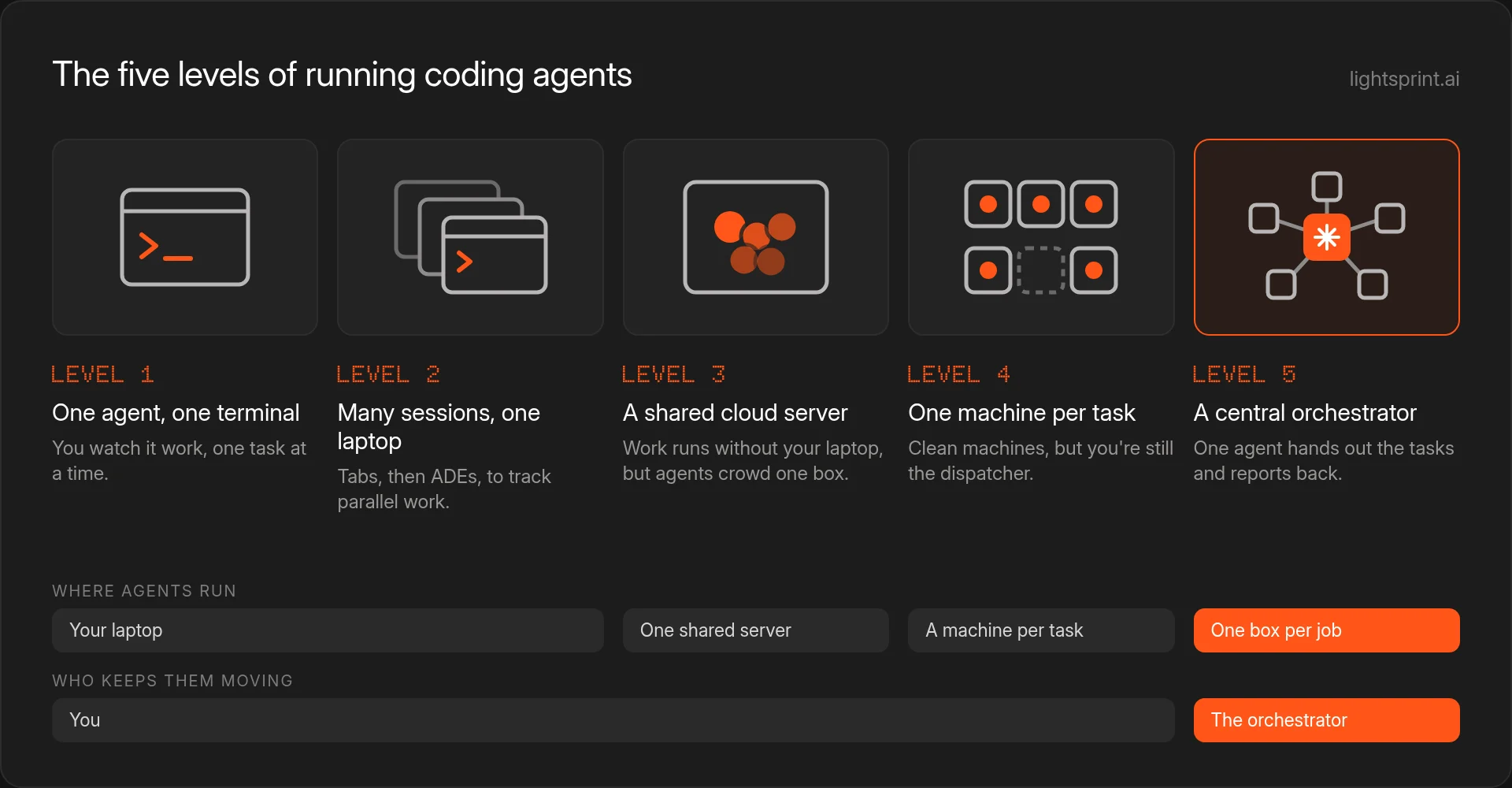
Level 1: One agent, one terminal
Everyone starts here. Open a terminal, start Claude Code or Codex, describe the task, then sit with it until it's done.
It's a great way to learn what agents can do. The problem is that the agent only moves as fast as you can watch it. Every permission prompt and every "should I continue?" waits on you.
Where it hurts: your attention is tied to a single session.
Level 2: Many sessions on one laptop
Next, you parallelize. A few terminal tabs, a different task in each, and suddenly you're getting several things done at once.
Until you lose track. One tab has been waiting on a question for who knows how long, and you can't remember which branch another one is on.
Agentic development environments (ADEs) such as herdr, cmux, Orca, T3 Code, and Conductor exist to fix exactly this. They give every session a home and make it easy to see what needs you. The catch is that all of it still lives on your machine.
Where it hurts: the work only runs while your laptop is open and awake.
Level 3: A shared server in the cloud
To get your laptop back, you move the agents onto a VPS. Now you can shut the lid and walk away, and the work keeps going.
The new problem is crowding. Every agent shares the same CPU, memory, file system, and ports. Builds slow each other down, dev servers collide on the same port, and two agents can end up editing the same files.
Where it hurts: agents get in each other's way on one box.
Level 4: A dedicated machine for every task
So each task gets a VM of its own. No more competing for resources. Machines start when a PR is opened and shut down once it's merged.
This is a real jump. Every agent has a clean environment, and one task can't break another.
What hasn't changed is who's driving. You're still the one checking each session, answering questions, and pushing work forward. The infrastructure scaled. You didn't.
Where it hurts: you've become the dispatcher.
Level 5: A central orchestrator
At the top, you stop managing coding agents directly. You hand the goal to one orchestrating agent. It splits the goal into tasks, launches the coding agents, follows up on them, and reports back. Subagents, builds, test suites, and dev servers each get their own machine when they need one.
Your role changes. Instead of keeping a dozen sessions moving, you decide what's worth building and step in only when a question needs human judgment.
The five levels at a glance
| Level | Where agents run | Who keeps them moving | Where it hurts |
|---|---|---|---|
| 1. One agent, one terminal | Your laptop | You | One task at a time |
| 2. Many sessions on one laptop | Terminal tabs or an ADE | You | Stops when your laptop does |
| 3. A shared server in the cloud | One VPS | You | Agents compete for CPU, memory, files, and ports |
| 4. A dedicated machine for every task | One VM per task | You | You're still switching between sessions |
| 5. A central orchestrator | A machine per subagent, build, test suite, or dev server | The orchestrator | Whatever comes next |
Where LightSprint fits
LightSprint is built for the top of this ladder. Nothing runs on your laptop. A change starts as a plan grounded in your real codebase, then agents work through it in cloud sandboxes, task by task, each in an isolated environment with the app running.
When agents do the running, the checks need to sit where people can see them. Each step is verified as it's built, with screenshots of what changed, and an engineer still approves every merge through the GitHub rules and CI you already use. See how it fits your engineering workflow.
The ladder keeps growing
New stages seem to show up about once a month, and today's top level won't stay on top for long. You also don't have to climb in order. Find the problem that costs you the most time, and jump straight to the level that solves it.
FAQ
What is a central orchestrator agent?
An orchestrator is an agent that manages other agents. You give it a goal. It breaks the goal into tasks, starts coding agents for each one, tracks their progress, and returns results or questions that need a person. You deal with one agent instead of many.
What is an ADE?
ADE stands for agentic development environment, a tool for running and keeping track of many coding agent sessions in one place. herdr, cmux, Orca, T3 Code, and Conductor are examples. They make parallel work easier to follow, though the agents usually still run on your own computer.
Why move coding agents off your laptop?
In the cloud, agents keep working after you close your laptop, and you aren't capped by one machine. But a single shared server brings its own problems, because agents compete for CPU, memory, files, and ports. That's why the next step is a separate machine for each task.
Does every agent need its own machine?
A VM per task stops agents from fighting over resources, and machines can start and stop as PRs open and merge. With an orchestrator in charge, the same idea goes further: every subagent, build, test suite, or dev server can get its own machine on demand.